
Your client picked 400 photos. Find their originals in one click.
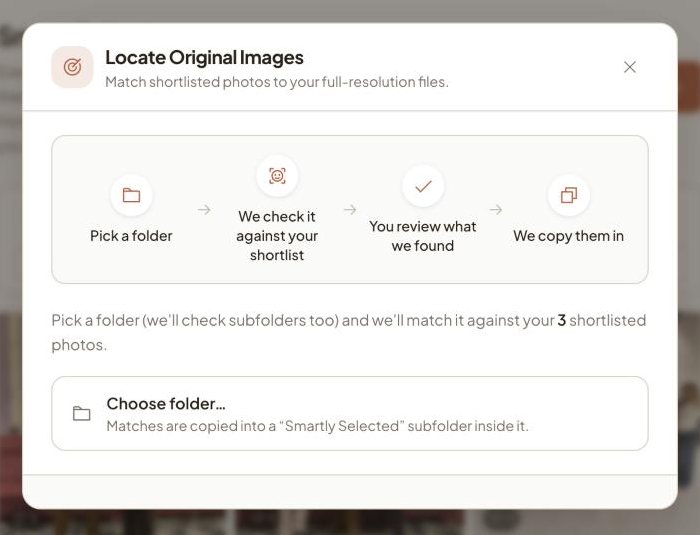
Locate Originals takes the photos your client shortlisted in the Vyavasth gallery, scans the folder of originals on your laptop, and copies every matching original, along with its RAW file, into a “Smartly Selected” folder for your editor. Matching happens on your own computer, so your originals are never uploaded again.
How Locate Originals works
- Shortlist the final photos
Use Smart Selects to shortlist the photos that go into the album, from the couple's likes or your own picks.
- Click Locate original images
Open it from the Smart Selects tab and choose the folder on your laptop or hard drive that holds the event's originals.
- Vyavasth matches every file
Each shortlisted photo is matched to the exact file it was uploaded from. Photos that need a second look are shown for you to confirm before anything is copied.
- Hand the folder to your editor
Matched originals, and their RAW files with the same name, are copied into a “Smartly Selected” subfolder inside the folder you picked, ready for your editor. Nothing else in your folder is changed.
The job it replaces
After selection, someone in the studio sits with a list of file names or screenshots and searches a hard drive for each one, then finds the RAW file next to it. For a wedding album that can take a full day, and one wrong file means a reprint.
Locate Originals does that matching for you, against the exact files you uploaded, so the editor gets the right originals the same day the selection is done.
Good to know
- Works in Google Chrome on a laptop or desktop. Other browsers show a note asking you to open the page in Chrome.
- Runs on your computer: originals are read from your drive and copied into a “Smartly Selected” subfolder there. Nothing is uploaded again.
- Brings the RAW file along when it sits next to the JPG with the same name.
- Run it again whenever the shortlist changes. It always works from the current shortlist.
What studios say
Photo selection ka kaam, jisme 2 mahine tak lag jaate the, wo ab 2 ghante mein hone laga hai. Album selection feature ne kaam bahut hi aasan kar diya hai.
Kamal Productions, Gwalior
Questions
Does Locate Originals work with RAW files?
Yes. When a matched photo has a RAW file with the same name in the same folder, the RAW file is copied too.
Do I need to upload my RAW files to Vyavasth?
No. You upload the photos you deliver. Locate Originals finds the originals and RAW files on your own drive and copies them there.
Which browser do I need?
Google Chrome on a laptop or desktop. It uses Chrome's ability to read and write a folder you choose.
Is it on every plan?
Yes, Locate Originals is part of Smart Selects, which is on every plan.
See it on your next wedding.
Related features
- Album selection
Vyavasth's Smart Selects turns album selection into likes inside the wedding gallery.
- Live delivery
With Vyavasth, photos reach the family's gallery during the event instead of weeks later on a pen drive.
- Face search
Vyavasth gives every wedding one gallery link and QR code.