
Album selection that couples finish in hours, not months
Vyavasth's Smart Selects turns album selection into likes inside the wedding gallery. The couple and their family like photos on their phones, the studio filters those likes by the bride's side, the groom's side, a single guest or the most liked, then shortlists the final set and pulls the original files in one go. No pen drives going back and forth, no Excel sheets of file numbers, no chasing the couple for three months.
How album selection works on Vyavasth
- Share one gallery link
The couple and family open the same gallery link or QR on their phones. Guests can tell you which side they are from, using labels you set, such as Bride Team and Groom Team.
- Everyone likes the photos they want
Likes are saved as they tap. Likes from the hosts, the couple and the family members who have the passcode, are marked as Host picks, so you can see what the family chose apart from everyone else.
- You filter and shortlist
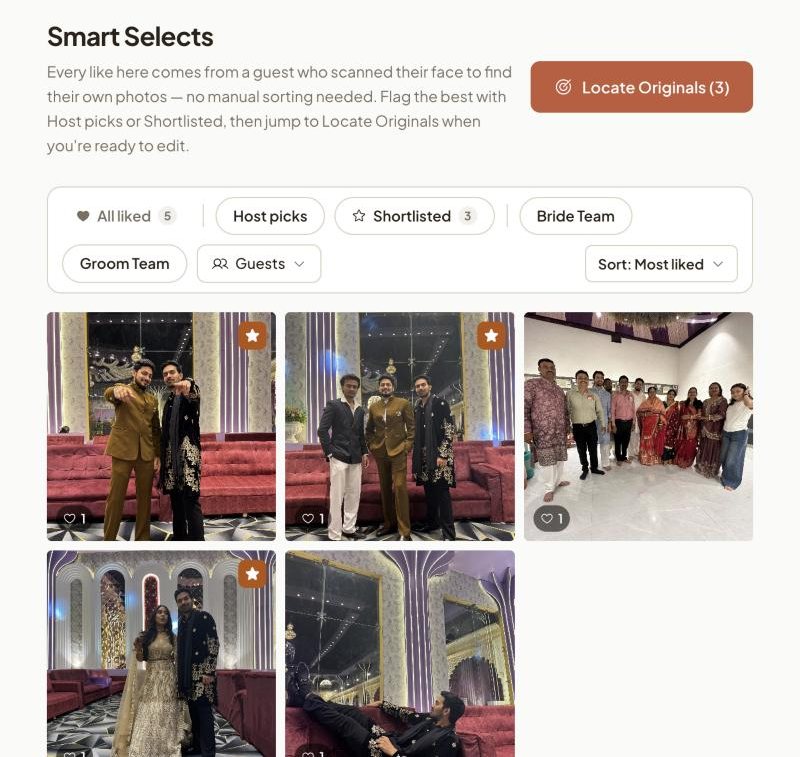
In the Smart Selects tab, filter likes by Host picks, by team, or by any guest who liked something, and sort by most liked. Shortlist the photos that go into the album.
- Pull the originals
Point Vyavasth at the folder of originals on your laptop. It finds the shortlisted photos and their RAW files and copies them into one folder for your editor.
Why album selection takes months, and what changes
In most Indian weddings the album waits on selection, not on editing. The studio sends a pen drive or a Google Drive link with thousands of photos, the couple promises to choose, the family wants a say, and the list comes back weeks later as screenshots or file numbers on WhatsApp. Then someone has to find those files by hand.
Vyavasth moves selection to the place the family already is: the gallery on their phone. Liking a photo is the selection. Nothing has to be typed, sent or matched by hand, so the studio can start the album as soon as the likes are in.
Filters made for Indian weddings
- Host picks: only the photos the hosts liked, the couple and family with the passcode.
- Team: the bride's side, the groom's side, or any labels you set for the event.
- Guests: anyone who has liked a photo, searchable by name, sorted by how much they liked.
- Most liked: what the whole family keeps coming back to.
- Shortlisted: your team's final picks for the edit.
Filters combine, so "Host picks from the bride's side, most liked first" is two taps.
What changes for the studio
- Albums start in days, because selection no longer blocks the edit.
- No file-number lists to decode and no wrong photos printed.
- The couple sees a premium, branded gallery instead of a drive folder, which is what they tell their friends about.
What studios say
Photo selection ka kaam, jisme 2 mahine tak lag jaate the, wo ab 2 ghante mein hone laga hai. Album selection feature ne kaam bahut hi aasan kar diya hai.
Kamal Productions, Gwalior
Questions
Does the couple need to install an app to select photos?
No. The gallery opens in the phone's browser from a link or QR code. They sign in with their WhatsApp number or Google so their likes are saved to them.
Can I see only what the family selected?
Yes. Likes from the hosts, the couple and family members with the passcode, show up as Host picks. Filter to just those, combine them with the bride's side or groom's side filter, or pick one guest by name.
Is album selection available on every plan?
Yes. Smart Selects, including the filters and locating originals, is on every plan, including pay per event.
Can relatives select photos too?
Yes. Anyone you share the gallery with can like photos. You decide whose likes count by filtering by host, team or guest.
See it on your next wedding.
Related features
- Locate originals
Locate Originals takes the photos your client shortlisted in the Vyavasth gallery, scans the folder of originals on your laptop, and copies every matching original, along with its RAW file, into a “Smartly Selected” folder for your editor.
- Face search
Vyavasth gives every wedding one gallery link and QR code.
- Live delivery
With Vyavasth, photos reach the family's gallery during the event instead of weeks later on a pen drive.