
How to find the RAW files for photos your client selected
By Bharat · 18 Oct 2026 · 5 min read
The couple has finally chosen their album photos. What came back is a WhatsApp message with 400 file names, a few screenshots, and an Excel sheet from the bride's sister. Now someone at the studio has to find every one of those photos in a folder of 8,000 originals, along with the RAW file for each, and hand them to the editor without missing one.
This guide covers the four ways studios do this, from fully manual to fully automatic, and the mistakes that lead to the wrong photo in a printed album.
Before you start: get a clean list of file names
Every method below works from a list of file names. The cleaner the list, the faster the search.
- Ask for file names, not screenshots. A screenshot of a photo forces someone to match it by eye.
- Keep the original camera names. If you rename files on export (for example
Rahul_Priya_0412.jpg), keep a record of the original camera name, or name the RAW file the same way. - Strip the extension. Search for
DSC_4512, notDSC_4512.jpg, so both the JPG and the RAW file (DSC_4512.CR3,DSC_4512.NEF,DSC_4512.ARW) match. - Watch for repeated numbers. Two cameras, or one camera after 9,999 shots, can produce the same file name. Check the folder or camera before you copy.
Method 1: Lightroom Classic
If your originals are already in a Lightroom catalogue, this is the quickest manual method.
- Open the wedding's folder in the Library module.
- Press the backslash key (
\) to show the Library Filter bar. - Choose Text, then Filename, then Contains.
- Paste the file names separated by spaces. Lightroom shows every photo whose name contains any of them.
- Select all, add them to a collection, and export the originals to a new folder for the editor.
Long lists can be slow to paste and easy to get wrong. Do it in batches of 50 to 100 names and check the count each time.
Method 2: Capture One
Capture One has a tool made for this.
- Open the Select menu, then Select By, then File Name List.
- Paste the list, choose the separator your list uses (for example space or new line), and tick Ignore file extension.
- Capture One selects every match. Move them to an album and export.
Method 3: Windows Explorer or Mac Finder
Without editing software, the computer's own search can work for small lists.
- Windows Explorer: open the folder, click the search box and paste the names. The search box is limited to around 259 characters, which is only a few dozen file names, so work in small batches.
- Mac Finder: open the folder and paste into the search field. Finder's search is also limited in length, so this suits short lists only.
For 400 photos this method takes hours. It is the fallback, not the workflow.
Method 4: let the gallery do the matching
The slowest part of every method above is the list itself: someone types it, someone else reads it, and every step can introduce a typo. Gallery tools built for album selection remove the list altogether (more on choosing a delivery method in pen drive, Google Drive or online gallery).
The couple and family like photos directly in the online gallery. The studio filters those likes, for example only the couple's picks or only the bride's side, and shortlists the final set. Because the gallery knows exactly which file each photo came from, it can find the originals for you.
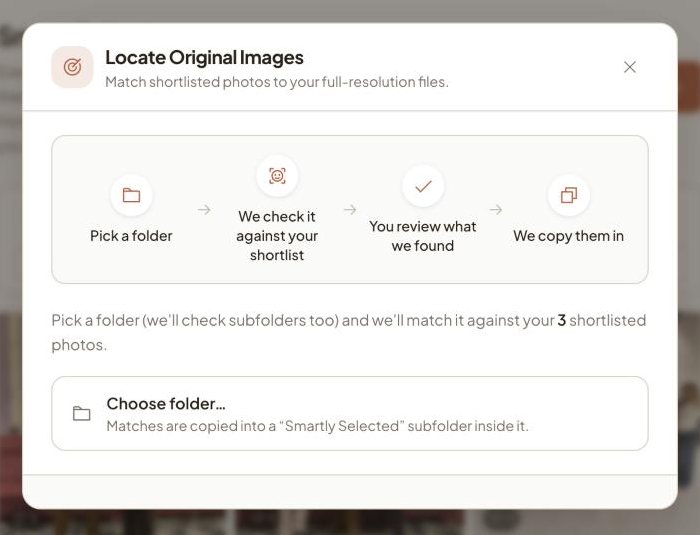
On Vyavasth this is called Locate Originals: you choose the folder of originals on your laptop, it matches every shortlisted photo to the exact file you uploaded, and copies those originals into a "Smartly Selected" folder inside it, bringing the RAW file along when it sits next to the JPG with the same name. It runs in Google Chrome on your own computer, so nothing is uploaded again.

Mistakes that cause reprints
- Matching by number only.
0412appears in many files. Always match the full name. - Forgetting the second camera. If two photographers shot the same function, their file names can collide. Keep each camera's photos in its own folder.
- Renaming JPGs but not RAWs. If the delivered JPG is renamed, the RAW file no longer shares its name. Rename both or neither.
- Copying edited exports instead of originals. Make sure the folder you search holds the camera originals, not an earlier export.
- Not counting. If the couple chose 400 and you copied 396, find the missing four before the editor starts.
Frequently asked questions
How do I select photos in Lightroom from a list of file names?
In the Library module, open the Library Filter bar, choose Text, Filename and Contains, and paste the file names separated by spaces. Lightroom shows every photo whose name contains any of them. Work in batches for long lists.
How do I get the RAW file for a JPG the client picked?
Search for the file name without its extension, so both DSC_4512.jpg and DSC_4512.CR3 (or .NEF, .ARW) match. This only works if the JPG and RAW still share the same base name.
Is there a way to skip the file-name list entirely?
Yes. If the couple selects photos by liking them in an online gallery, the gallery already knows which files were chosen. Tools such as Vyavasth's Locate Originals then find and copy the matching originals from your drive.
Why are some selected photos missing when I search?
Usually because the file was renamed on export, the name was typed wrong in the list, or the photo came from a second camera whose files are in another folder. Compare the count of names with the count of files found.
Deliver your next wedding on Vyavasth.
More guides
- How to run album selection when both families want a say
The bride's side wants one set of photos, the groom's side another. How studios handle two families in album selection without months of back and forth.
- Album selection on Excel, WhatsApp or an app: what actually works
The four ways Indian studios collect album selections from couples, what each one costs in time and mistakes, and when each one still makes sense.
- Why wedding album selection takes months, and 7 ways to get couples to finish
Album selection is where most Indian wedding albums get stuck. Why couples take months to choose, and seven practical ways studios get it done in days.